2023. 10. 25. 01:38ㆍFront/NextJs 14
시작하면서.
Next.js (13) 를 짤막하게 배웠고, Node.js 기반 백엔드 개발 경험을 해보고 싶어 작은 프로젝트를 시작했습니다.(Next.js 14로 Upgrade 2023.10.28)
Cloudflare의 Workers를 사용하여, 로그인이 없는 특정 예약 페이지를 1분 주기로 확인하여 Discord 푸시를 주도록 만들어 봤는데, Pages를 활용하면 Next.js를 활용한 풀스택 구성의 무료 호스팅 (10만요청 / 1일)이 가능한 듯 합니다.
너무 빠르게 업데이트 되어 공식 문서에도 반영되지 않은 내용이 있던것 같아서 (혹은 커뮤니티의 답변이 이미 업데이트 되는 등) 부딪힌 문제와 유용했던 내용을 두서 없이 남깁니다.
1. Next.js 프로젝트 생성
아래와 링크를 참고하여, cloudflare를 위한 Next Project를 미리 구성한다.
npm create cloudflare@latest 프로젝트명 -- --framework=nexthttps://developers.cloudflare.com/pages/framework-guides/deploy-a-nextjs-site/#use-the-edge-runtime
Deploy a Next.js site · Cloudflare Pages docs
Next.js is an open-source React framework for creating websites and applications. In this guide, you will create a new Next.js application and deploy …
developers.cloudflare.com
프로젝트 구성 중, src 사용여부는 N으로 했고, ESLint나 Typescript는 취향껏 선택한다.
그 중, Next.js 13 에서 새로 나온 기능이라고 하는 /app 폴더 방식의 구성을 사용한다. next.config.js에 experimental:{appDir: true} 를 넣으라는 공식문서 설명 글을 참고한 글이 있었는데, 해당 옵션을 추가하면 이미 안정화 되어 기본설정이 되어 있으니 제거한다는 식의 내용이 나온다.
2. Cloudflare Pages 배포를 위한 프로젝트 내 설정
Cloudflare에서 배포시 사용할 Node.js 버전 환경설정 값으로 적용되도록, 최상위 경로(app, package.json 과 같은 경로) 에, " .nvmrc " 파일을 생성하여, 20.8.1 과 같이 버저닝 정보를 저장 한다.
그 외 설정 파일 next.config.js package.json 은 아래와 같이 되어있다.
next.config.js
/** @type {import('next').NextConfig} */
const nextConfig = {
    experimental: {
      runtime: 'experimental-edge',
    },
    reactStrictMode: true,
    swcMinify: true,
  }
  module.exports = nextConfig
package.json
{
  "name": "my-next-app",
  "version": "0.1.0",
  "private": true,
  "scripts": {
    "dev": "next dev",
    "build": "next build",
    "start": "next start",
    "lint": "next lint"
  },
  "dependencies": {
    "@chakra-ui/next-js": "^2.1.5",
    "@chakra-ui/react": "^2.8.1",
    "@emotion/react": "^11.11.1",
    "@emotion/styled": "^11.11.0",
    "eslint": "8.52.0",
    "eslint-config-next": "13.5.6",
    "framer-motion": "^10.16.4",
    "next": "13.5.6",
    "react": "18.2.0",
    "react-dom": "18.2.0"
  },
  "devDependencies": {
    "@cloudflare/next-on-pages": "^1.7.2"
  }
}
3. 서버리스 ( Edge runtime ) 환경을 위해 코드 작성시 고려할 부분
1. 아래의 코드에서, 'use client' 선언을 하지 않았을 때 배포 과정에서 에러가 발생했다. ( SSR 되어서. )
dynamic(()=>import ... {ssr: false}) 와 같이 처리하는 방식도 있는듯 한데, 내공이 부족하여 해결은 못했고 Hint로 남겨만 뒀다.
'use client'
import dynamic from 'next/dynamic';
import {Card,Text,Stack,CardBody,} from "@chakra-ui/react";
import {Alert,AlertIcon} from "@chakra-ui/react";

// const MyCard = dynamic(() => import('./sites/page'), { ssr: false })

export default function MyCard() {
  return ( ... )
}
2.
app/sites/[uid]/page.js
export const runtime = 'edge';

export default function Sites(props) {
    return (
        <>
            <h1>URL is '{props.params.uid}'</h1>
        </>
    )
}
위와 같은 구성으로 Router 기능을 사용하는 파일에서,
가장 상단에 export const runtime = 'edge'; 를 기재하지 않은 경우,
ERROR: Failed to produce a Cloudflare Pages build from the project. The following routes were not configured to run with the Edge Runtime: - /sites/[uid] Please make sure that all your non-static routes export the following edge runtime route segment config: export const runtime = 'edge';
라는 내용의 에러로 배포에 실패한다.
Cloudflare 배포시 로그.
| 23:25:06.707 | ▲ Collected static files (public/, static/, .next/static): 5.955ms |
| 23:25:07.994 | ▲ Build Completed in .vercel/output [32s] |
| 23:25:08.031 | ⚡️ Completed `npx vercel build`. |
| 23:25:09.251 | |
| 23:25:09.251 | ⚡️ ERROR: Failed to produce a Cloudflare Pages build from the project. |
| 23:25:09.251 | ⚡️ |
| 23:25:09.251 | ⚡️ The following routes were not configured to run with the Edge Runtime: |
| 23:25:09.251 | ⚡️ - /sites/[uid] |
| 23:25:09.251 | ⚡️ |
| 23:25:09.252 | ⚡️ Please make sure that all your non-static routes export the following edge runtime route segment config: |
| 23:25:09.252 | ⚡️ export const runtime = 'edge'; |
| 23:25:09.252 | ⚡️ |
| 23:25:09.252 | ⚡️ You can read more about the Edge Runtime on the Next.js documentation: |
| 23:25:09.252 | ⚡️ https://nextjs.org/docs/app/building-your-application/rendering/edge-and-nodejs-runtimes |
| 23:25:09.252 | |
| 23:25:09.271 | Failed: Error while executing user command. Exited with error code: 1 |
| 23:25:09.286 | Failed: build command exited with code: 1 |
| 23:25:10.342 | Failed: error occurred while running build command |
최상단 링크에서도 이유를 알 수 있는데, 그 이유는
The default template uses traditional Node.js-powered routes that are not supported on Cloudflare Pages. To run your application, you need to opt into the Edge Runtime for any routes that have server-side functionality (for example, API routes or pages that use getServerSideProps). To do this, you need to export a runtime route segment config option from each route’s file.
기본 템플릿은 Cloudflare Pages에서 지원되지 않는 기존 Node.js 기반 경로를 사용하여, 서버 측 기능이 있는 모든 경로(예: 를 사용하는 API 경로 또는 페이지)에 대해 Edge 런타임을 선택해야 한다.
4. Cloudflare Pages 배포 환경 설정
1. 가이드가 친절하고 간단하여 배포 과정을 간단히 적으면,
- github Repository 생성
- Cloudflare Pages 배포하기=> github 연동 ( 전체 Repository에 권한을 모두 부여 ) => 해당 프로젝트 선택
- 배포하는 과정의 설정에서 framework는 Next.js 선택
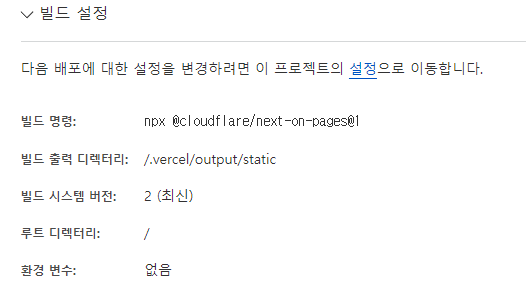
과 같이 진행하면 된다. 그 외 build command 와 같은 설정은 아래 이미지와 같이 Cloudflare에서 추천하는 내용으로 설정한다.
2. 이후 연동된 github으로 커밋 되는 내용은 자동으로 빌드->배포 과정이 이루어진다.
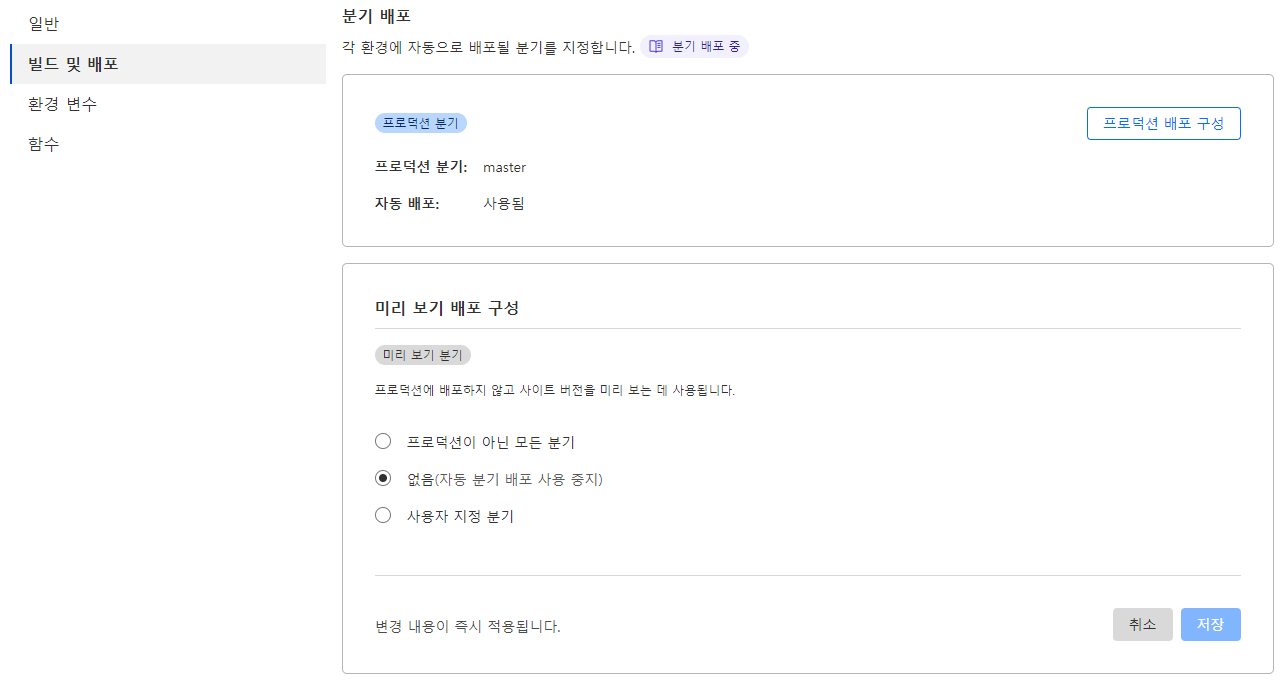
Master 브랜치가 아닌 다른 브랜치에 Merge 하지 않은 내용도 빌드->배포 과정이 이뤄지는 듯 보였는데, 해당 내용은 미리 보기 페이지에 대한 배포로, "미리 보기 배포 구성" 에서의 설정을 변경하여야 한다.
그 외, 참고할 내용
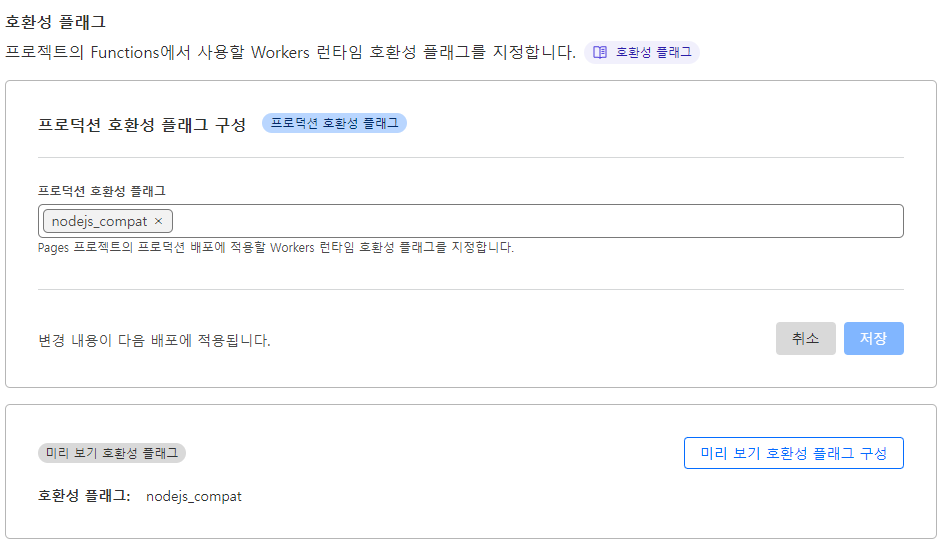
1. 최초에 배포가 실패하여 이것 저것 해보다가, Cloudflare 배포 환경 설정중 "호환성 플래그"에 nodejs_compat를 추가한 것이 있다. 깜빡하고 있었는데, 너무 시도를 많이해서 연관성이 기억나지 않는다. 추후에 제거를 하든가 확인하여 수정할 예정.
https://developers.cloudflare.com/workers/runtime-apis/nodejs/
2. 도움이 된 공식 문서나 트러블슈팅 참고한 글 링크.
- 위에 글 내용중, export const runtime = 'edge'; 를 적은 내용으로 해결
https://nextjs.org/docs/app/api-reference/file-conventions/route-segment-config#runtime
https://github.com/cloudflare/next-on-pages/issues/109
- MongoDB Atlas 연동 ( Free tier )
- 차크라UI를 사용한 CSS 작성
- SSR 위주 가장 반응이 빠르도록 최적화